

Present HD content wirelessly with
Crestron AirMedia, using laptops and mobile device.
Today, the ability to easily share content in meetings is becoming a standard expectation. Even with a range of different devices in a meeting, people expect to be able to share their content without technology frustrations. With Crestron AirMedia this is all possible and it couldn’t be easier.
Crestron’s AirMedia solution enables anyone to walk into a room and share content wirelessly from their laptop, PC, smartphone or tablet. Whether you are sharing content from PowerPoint, Excel, Word or sharing PDF documents and photos, AirMedia makes presenting and collaborating on content from a range of devices, simple, fast and effective.
 |
To learn more about Crestron AirMedia check out the features below. Alternatively, please get in touch with our team. As a Crestron Elite Partner, we have the experience and expertise to advise on the best Crestron wireless presentation solution based on your specific requirements.
1-2-3 Present!
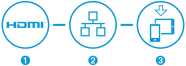
Present and collaborate with Crestron AirMedia in three simple steps:
-
Connect your display to the HDMI output of AirMedia
-
Connect AirMedia to your building’s LAN
-
Download the free app to your iOS or Android device – or connect using the web browser on your laptop


Crestron AirMedia Features and Specifications
Present wirelessly from your laptop, PC or smartphone
With Crestron wireless presentation you can share content easily from a wide range of devices. No software installation is required for laptop or Mac users; just use your web browser and follow the instructions on the meeting room display. If you are on a smartphone or tablet, download the free app for iOS or Android and share content via Crestron AirMedia instantly. Without the need to connect with a wire to share content you can enjoy a clutter free collaboration session.
Quad view and multi-user collaboration
The need for multiple participants to share different content is a frequent occurrence in meetings. The quad view mode in Crestron AirMedia allows four independent images to be displayed simultaneously on screen; allowing users to compare different data without needing to toggle back and forth. Furthermore, with the ability to connect up to 32 participants at once, AirMedia gives everyone the chance to be on screen.
Moderator Mode
In classrooms or staff training sessions, moderator mode gives full control of the presentation to the instructor. With up to 32 participants connected, the instructor can easily control whose content is on show and position this content where they wish in the quad view.
Play, Pause, Stop
The simplicity of AirMedia is further realised with the Play, Pause and Stop functionality. On your AirMedia enabled device, clicking the Play button makes you the presenter, displaying whatever content you have on your screen. Once you have finished, clicking the Stop button will take your content off screen.
The Pause button, gives additional functionality and solves a common meeting room problem. When presenting, it is often the case you need to find some additional material related to your presentation. In this situation, pressing Pause freezes the image on screen, allowing you to look through confidential files or emails to find your material. Once found, simply press Play to continue your presentation.
Enterprise-wide deployment
Crestron enable you to deploy AirMedia across your organisation with the free enterprise PC application for Windows or Mac OS. Silently deploy the Crestron AirMedia app to employee desktops and enable them to connect to any approved AirMedia device with single click.
Remote viewing
Remote viewing adds more functionality to Crestron AirMedia, allowing meeting participants to view the presentation through their own browsers. Remote viewing mode displays the presentation as static images which can be refreshed manually or set to refresh automatically every few seconds. Furthermore, remote viewers can save presentation images to their device to review later on.
Connection methods
To accommodate all presentation environments, user types and IT requirements, AirMedia enables the presenter to connect in several different ways:
System integration
As with all Crestron solutions, AirMedia isn’t restricted to small single-display applications. It can be used alongside other AV systems such as Crestron RL 2 to provide a wireless content sharing option. Crestron AirMedia can be integrated and controlled as part of a complete Crestron control system using a touch screen, wireless remote, or mobile device.
Customisable welcome screen
Ensure meeting participants can maximise productivity by providing a customisable home screen that welcomes meeting participants as they enter the room. Easy to follow instructions allow presenters to connect quickly and the ability to add the room name and company logo further reinforces your organisation’s brand.
Why Choose Cinos?
As a Crestron Elite Partner, Cinos are perfectly placed to deliver AirMedia into your organisation. We have the experience and expertise to advise on the best Crestron wireless presentation solution based on your specific requirements. So if you prefer the ease of speaking with an expert please do not hesitate to get in touch. We would be delighted to help.

Crestron Case Studies

Setting the Global Standard: UK Rollout of Logitech-Powered Microsoft Teams Rooms for a Leading SaaS Provider
Our client is a leading name in business management SaaS solutions. Its operations span multiple locations, supporting millions of small and medium size businesses globally. With a significant UK presence, the client wanted to ensure a consistent and efficient meeting experience

A Modern Refresh for a Leading Innovation Centre in Asia
Situated in one of the world’s most prestigious business locations in Asia, the Innovation Centre serves as a hub where customers can experience the latest technology through interactive demonstrations. As a multi-functional space used for client demonstrations, events, and internal meetings,

Inspiring collaboration and innovation at Nurasa’s Food Tech Innovation Centre
Located in the heart of Singapore’s research, innovation and development hub, The Food Tech Innovation Centre (FTIC) is a culinary development facility that supports and accelerates the adoption of sustainable foods across Asia. Nurasa in partnership with the Singapore Institute of

Enhanced communication and collaboration for NTT Ltd. offices
As part of NTT DATA, a USD 30 billion IT services provider, NTT Ltd. is a leading IT infrastructure and services company serving 65% of the Fortune Global 500 and more than 75% of the Fortune Global 100. It enables businesses

Cinos delivers Poly based Zoom Rooms for Global Investment Company
With offices across Europe, North America and Asia-Pacific (APAC), our client is a global investment organisation dedicated to developing companies across multiple regions and business models. By investing across a range of sectors, it helps organisations achieve sustainable growth, operational excellence


